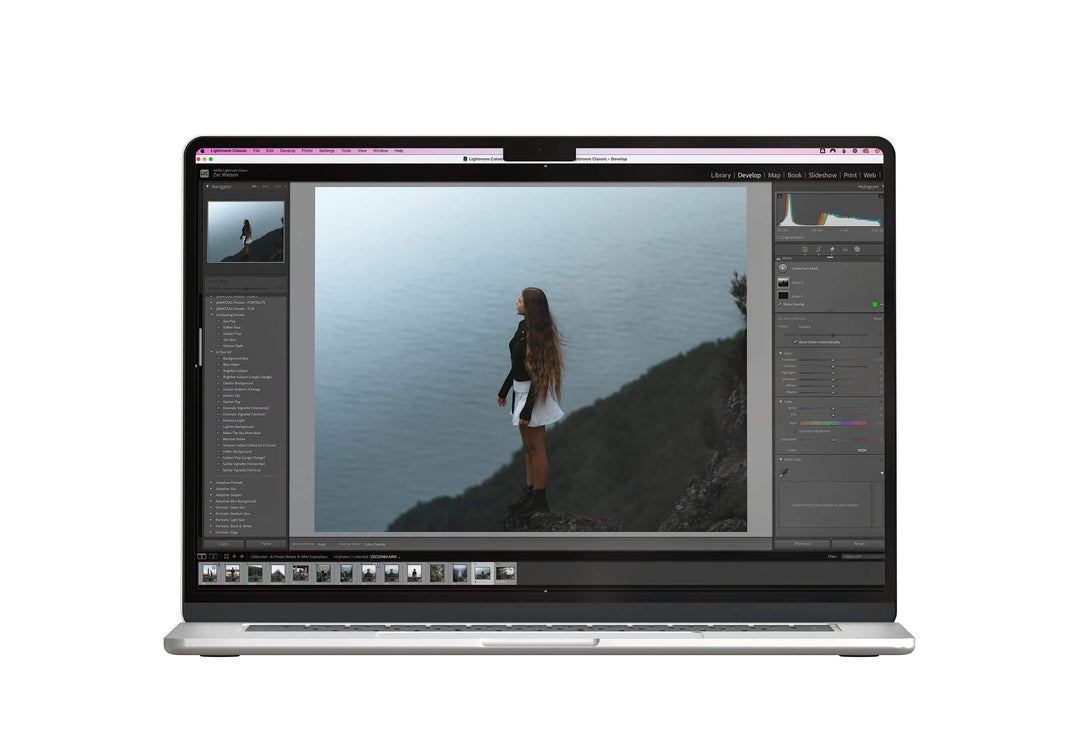
The AI Lightroom Toolkit
- Safe & Secure Checkout
- Desktop & Mobile Compatible
- Instant Download
Edit your photos instantly with AI-powered Lightroom tools.
These tools are designed to fix common photo issues. Brighten subjects, blur backgrounds, enhance skies, tan skin, whiten teeth and more. Just click the tool that matches what your photo needs, and let the AI Lightroom Toolkit do the rest.
- Contains 55 Unique AI Lightroom Tools
- Compatible With Lightroom Classic, Lightroom Mobile (iOS and Android) and Lightroom CC
- Detailed User Guide To Make Sure You Get The Best Results
These tools work by harnessing Lightroom’s AI masking features, which automatically detect and separate elements like the subject, background, sky, skin, eyes, and more.
Each tool applies a tailored adjustment to just that specific area, whether it’s brightening a face, blurring a background, or making your subject pop.
Instead of spending time manually brushing or masking, these do the heavy lifting for you in one click, giving you clean, professional-looking edits in seconds.
- Base Edits – Highlight Saver.xmp
- Base Edits – Image Brighten.xmp
- Base Edits – Image Cool Down.xmp
- Base Edits – Image Darken.xmp
- Base Edits – Image Warm Up.xmp
- Base Edits – Shadow Boost.xmp
- Subject – Brighten S...(Large Change).xmp
- Subject – Brighten Subject.xmp
- Subject – Cool down.xmp
- Subject – Clothing Brighten.xmp
- Subject – Clothing Contrast Boost.xmp
- Subject – Clothing Darken.xmp
- Subject – Contrast.xmp
- Subject – Darken.xmp
- Subject – Dream Skin.xmp
- Subject – Eyes – Brighten.xmp
- Subject – Eyes – Pop.xmp
- Subject – Eyes – Whiten.xmp
- Subject – Sharpen Subject.xmp
- Subject – Soften Face.xmp
- Subject – Subject Pop (Large Change).xmp
- Subject – Subject Pop.xmp
- Subject – Tan Skin.xmp
- Subject – Tan Skin Extra.xmp
- Subject – Warm up.xmp
- Subject – Whiten Teeth.xmp
- Utility – Background Blur.xmp
- Utility – Background Cool Down.xmp
- Utility – Background Darken.xmp
- Utility – Background De-saturate.xmp
- Utility – Background Lighten.xmp
- Utility – Background Soften.xmp
- Utility – Background Warm Up.xmp
- Utility - Background Lower Contrast.xmp
- Utility – Bloom – Highlights.xmp
- Utility – Bloom – Highlights Cool.xmp
- Utility – Bloom – Highlights Warm.xmp
- Utility – Bloom – Sky.xmp
- Utility – Blue Water.xmp
- Utility – Darken Bottom of Image.xmp
- Utility – Darken Bottom Extra.xmp
- Utility - Darken Left Side.xmp
- Utility - Darken Right Side.xmp
- Utility – Darken Top.xmp
- Utility – Light – Cool Down.xmp
- Utility – Light – Enhance.xmp
- Utility – Light – Enhance Top Left.xmp
- Utility – Light – Enhance Top Right.xmp
- Utility – Light – Enhance Top.xmp
- Utility – Light – Soften.xmp
- Utility – Light – Warm Up.xmp
- Utility – Remove Noise.xmp
- Utility – Sky Blue.xmp
- Utility – Sky Brighten.xmp
- Utility – Sky Contrast.xmp
- Utility – Sky Darken.xmp
- Utility – Sky Soften.xmp
- Utility – Sky Warm up.xmp
- Utility – Vignette Dramatic (Horizontal).xmp
- Utility – Vignette Dramatic (Vertical).xmp
- Utility – Vignette Subtle (Horizontal).xmp
- Utility – Vignette Subtle (Vertical).xmp
Included with your purchase is an easy installation & user guide.
I have made video guides to show you how to install the tools on Desktop (Mac and Windows).
The process is very simple and I break down each individual step to keep it eay to follow.
I also include a complete guide of how I personally use these presets to get the best results.
If you are still having trouble installing or using the presets. You can contact me via E-mail - info@watzac.com where I'm more than happy to help you out!